
MGM-Chat
We’re excited to announce a brand-new feature across the Malevolent Multiverse platform: integrated Chat! Whether you’re hanging out on the website, prepping your next session in the launcher, or deep in-game, stay connected with your friends and guildmates seamlessly.
Chat works the same way everywhere, and as long as you’re logged in, you’re ready to go. The launcher updates itself the next time you open it.
Launcher
-
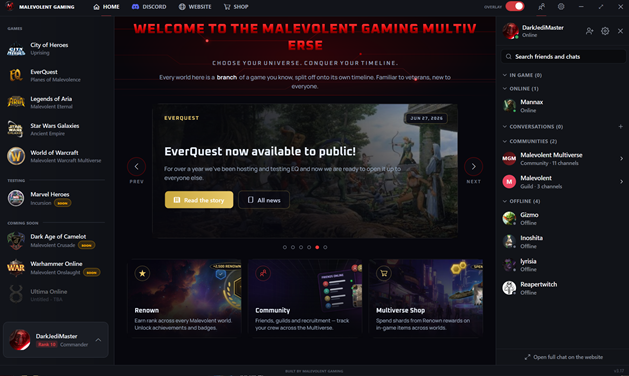
New Friends List: Click Friends in the top bar to open it on the right side of the launcher. It shows who’s online, who’s in game, and what they’re playing, plus your conversations and communities. Click anyone to start chatting without leaving the launcher.
-
See What Your Friends Are Playing: When you start WoW, SWG, EverQuest, City of Heroes, or Legends of Aria from the launcher, your friends will see it—even if you have the overlay turned off.
-
Windows Notifications: Receive alerts for new messages and @mentions while the launcher is minimized or the friends list is closed. Click a notification to jump straight into the conversation.
In-Game Overlay
-
Chat Tab: Houses everything included in this new feature.
-
In-Game Pop-ups: Get real-time pop-ups while you play for direct messages and @mentions. Click one to instantly open that conversation.
-
Clickable Links: Links sent in chat now open directly in your web browser.
Website
-
Quick Chat Access: A new chat button is available in the bottom-right corner of every page when logged in.
-
Full Chat Page: Access the dedicated full-page chat at
malevolentmultiverse.com/chat . -
Guild Integration: Guild pages now feature a dedicated Guild Chat button.
Community & Guild Channels
-
Malevolent Multiverse Community Space: Everyone is automatically included in this central hub. It includes
#welcome(news and announcements),#general,#lfg,#off-topic, and dedicated channels for each game:#swg,#wow,#eq,#coh,#loa, and#marvel-heroes. -
Dedicated Guild Spaces: Every guild gets its own dedicated space (similar to a Discord server), pre-configured with
#general,#announcements, and#officers. -
Custom Channel Management: Guild officers can build out their space by creating, renaming, reordering, and deleting channels. They can also group channels into categories, restrict access by rank, set channels to announcement-only, or enable slow mode.
-
Chat Migration: Existing guild chat histories have been seamlessly moved into your guild’s
#generalchannel.
Messaging Features
-
Group Chats: Create private group chats with up to 10 friends.
-
Reactions & Replies: Express yourself with emoji reactions and inline message replies.
-
@Mentions: Type
@to tag specific players. Officers can also use@everyoneand@here. -
Message Controls: Edit or delete your own messages anytime.
-
Rich Text Formatting: Full support for bold, italic, ~~strikethrough~~,
code, ||spoilers||, and clickable links. -
Presence & Tracking: Includes typing indicators, unread counts, and a New marker showing exactly where you left off.
-
Muting: Mute any conversation or channel at will (@mentions will still notify you).
Status & Presence
-
Status Modes: Set your status to Online, Away, Busy, or Appear Offline.
-
Do Not Disturb: Setting your status to Busy suppresses chat pop-ups and sound notifications.
-
Auto-Away: Browsing the website automatically sets your status to Away after 10 minutes of inactivity.
Privacy & Safety
-
Player Blocking: Block players to stop incoming messages and friend requests, as well as hide their messages in shared channels.
-
DM Security: Direct messages are accepted from friends and guildmates by default (guildmate DMs can be toggled off in Chat Settings).
-
Moderation & Reporting: Report inappropriate messages directly to moderators with one click. Moderators have tools to delete messages and temporarily time out players who break rules.
For Guild Leaders
Three new rank permissions have been added to your guild’s Ranks tab:
-
Chat: Create & Edit Channels
-
Chat: Moderate (delete messages, time out members, handle reports)
-
Chat: Use @everyone / @here
Note: Existing ranks have been automatically assigned these permissions based on their previous capabilities (e.g., ranks that could kick members can now moderate chat; ranks that could manage settings can manage channels; ranks that could manage posts can use mass mentions). You can fine-tune these anytime on the Ranks tab.