 The Malevolent Launcher
One launcher. Every world.
The Malevolent Launcher installs, patches and launches every game on the network from a single app — sign in once and jump straight into any world in the Multiverse.
Everything, one window
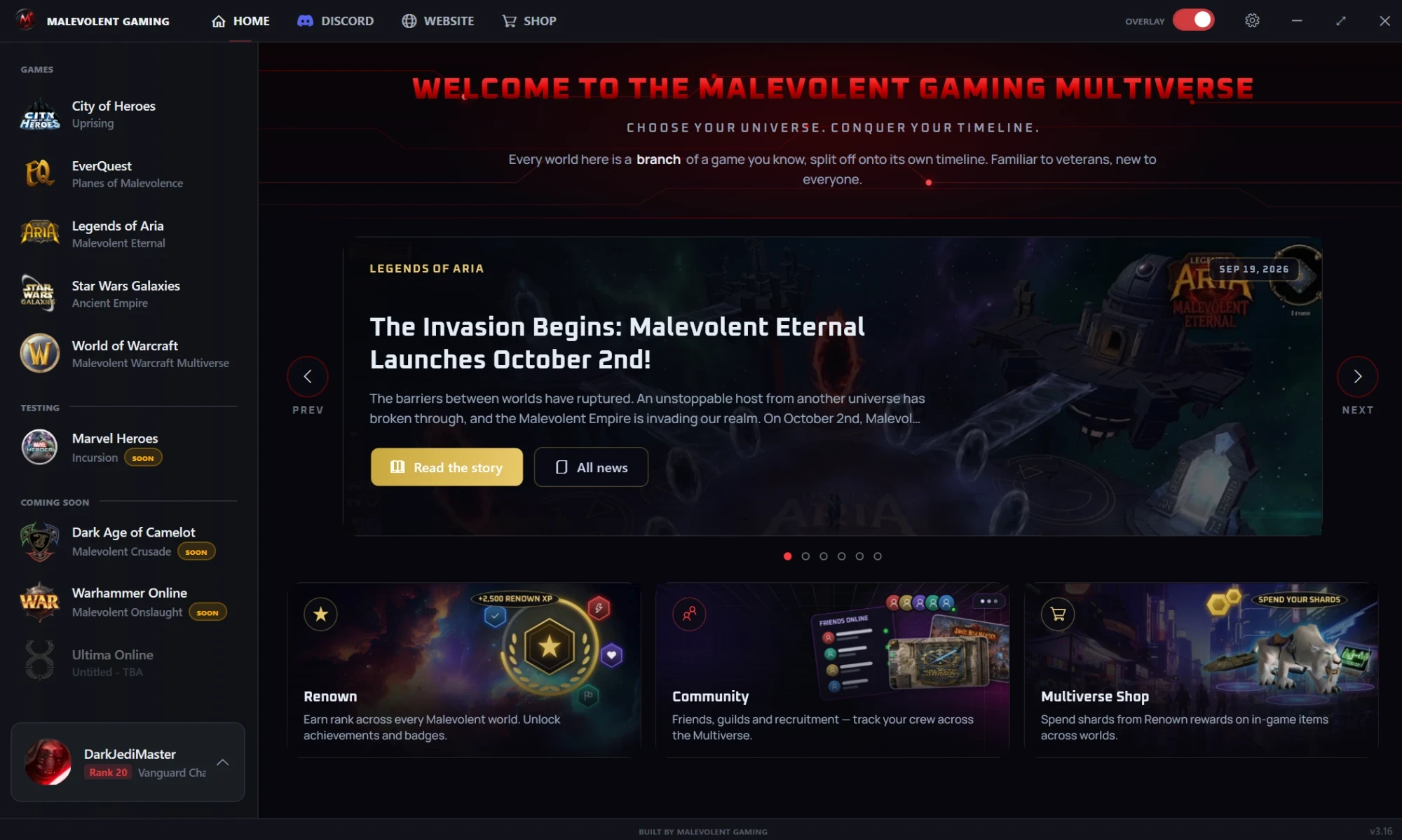
This is the launcher as you will see it. Pick a number to see what each part does.
- 1
Every world, one library
The five live worlds in one list. Pick one, install it, launch it — no scattered clients or patchers.
- 2
Testing and coming soon
Worlds in testing get their own group, and the ones on the way are already on the shelf.
- 3
Signed in, rank and all
One Malevolent account signs you into every world. Your Renown rank and title ride along in the corner.
- 4
News from the Multiverse
The latest stories from the site, right on the home screen and one click from the full post.
- 5
Renown, Community, Shop
Your rank and achievements, your friends and guilds, and the Shards store, each a click away.
- 6
In-game overlay
Flip it on for live notifications from the community and the network, without alt-tabbing out.
The launcher updates itself and patches your games before they run, so you are never on the wrong build.
Minimize it to the system tray and it stays out of the way until you need it.
64-bit, on a desktop or laptop PC. Each world installs separately, so keep room for the ones you play.
Up and running in three steps
The launcher is shared through our Discord, alongside everything else you need to get playing.
Join the Discord
Everything starts in the Malevolent Discord — it is where you create your account and pick up the launcher.
Grab the download
The current launcher download is posted in #3-download-launcher. Download it and run the installer.
Sign in and play
Open the launcher, sign in with your Malevolent account, install the worlds you want and jump in. No account yet? It is one click in #2-create-your-account.
Your whole Multiverse, one click away
Join the community, grab the launcher, and start your legend across every world.